
Choosing the right interactive flat panel (IFP) can transform the way teachers explain concepts, students collaborate, and teams share ideas. However, with different screen sizes, touch technologies, operating systems, camera options, and warranty packages available, selecting the right display requires careful planning.
This interactive flat panel buying guide for 2026 explains seven important factors to consider before investing in a smartboard for your school, college, coaching centre, or office.
Whether you’re comparing interactive displays for a new smart classroom or upgrading an existing learning space, these practical tips will help you make a more informed decision.
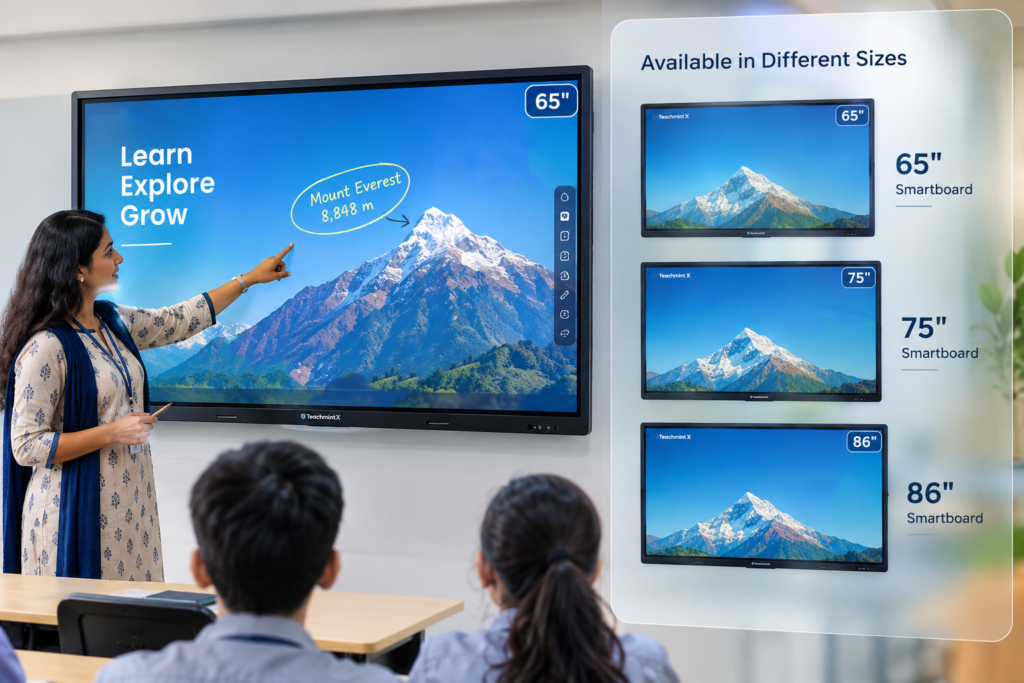
1. Choose the Right Interactive Flat Panel Size
The best screen size depends on your room dimensions, seating arrangement, viewing distance, and the amount of content displayed.
A panel that is too small may make text difficult to read from the back of the classroom, while an oversized display may be unnecessary for a compact meeting room.
Use the following as a preliminary guide, not a fixed rule:
- 65-inch interactive flat panel: Small classrooms, meeting rooms, and compact training spaces.
- 75-inch interactive flat panel: Standard classrooms and medium-sized collaboration spaces.
- 86-inch interactive flat panel: Larger classrooms where visibility from the back row is important.
- 98-inch interactive flat panel: Large teaching spaces, conference rooms, and selected auditoriums.
Before making a decision, check the distance between the screen and the farthest viewer. Consider the size of text, diagrams, presentations, and educational content you intend to display.
Buying tip: Visit a demonstration centre to compare screen sizes in person before choosing a panel for your classroom.
2. Look for 4K UHD Resolution
Resolution affects how clearly text, diagrams, images, and videos appear on an interactive display.
A 4K UHD panel has a resolution of 3840 × 2160 pixels. This can help teachers present detailed diagrams, annotate documents, display educational videos, and explain complex concepts with greater clarity.
When comparing interactive flat panels, check:
- Native display resolution rather than just supported input resolution.
- Brightness and readability under your room’s lighting conditions.
- Viewing angles and colour reproduction.
- Anti-glare performance and screen reflections.
- Compatibility with the computers and devices you plan to connect.
For schools that regularly display small text, detailed illustrations, spreadsheets, or 3D learning content, 4K resolution is an important specification to consider.
3. Evaluate Touch Accuracy, Writing Comfort, and Screen Protection
An interactive flat panel should feel comfortable to use during everyday teaching and presentations.
Teachers may need to write equations, annotate PDFs, highlight text, draw diagrams, and interact with digital learning materials for several hours a day.
Before buying, evaluate these features:
- Touch responsiveness: Check whether the screen responds accurately to finger and stylus input.
- Multi-touch support: Confirm how many simultaneous touch points the model supports.
- Palm rejection: Test whether the display can distinguish intended pen input from unwanted hand contact.
- Writing experience: Try handwriting, drawing, erasing, and annotating content during a live demonstration.
- Screen protection: Check the glass type, thickness, hardness rating, and maintenance instructions in the manufacturer’s specifications.
Some models use infrared touch technology, while others may use different implementations. Zero-bonding, glass specifications, and touch capabilities also vary by model.
Buying tip: Test the actual model you intend to purchase. A specification sheet alone cannot fully demonstrate the writing experience.
4. Check Android Certification, Software, and Security Updates
The operating system determines which apps you can use, how you access educational tools, and how the display fits into your existing digital classroom setup.
If you plan to use Google apps, check whether the specific model has Google EDLA certification and access to licensed Google services.
A certified configuration can provide access to supported Google Play apps and Google security features, subject to the device’s compatibility and update policies.
Before purchasing, confirm:
- The exact Android version supplied with the model.
- Whether Google EDLA certification applies to that specific model.
- Access to Google Play and the apps your teachers need.
- The manufacturer’s operating system and security update policy.
- Available storage, RAM, and application compatibility.
- Whether the panel supports the teaching software used by your institution.
Do not assume every Android-based smartboard offers the same Google services or update support. Verify the certification and software details for the exact model.
For example, if you are considering a Teachmint X model, ask the authorised seller to demonstrate its interface, educational tools, supported apps, and available updates before making a purchase.
5. Decide Whether You Need a Built-In Camera and Microphone
A built-in camera and microphone may be valuable for institutions that conduct hybrid classes, record lessons, host video conferences, or connect remote students with teachers.
However, not every classroom needs these features.
Consider a camera-equipped model if you:
- Conduct online or hybrid lessons.
- Run video meetings or remote training sessions.
- Need camera features such as supported auto-framing.
- Want an integrated setup with fewer external accessories.
Consider a model without a built-in camera if you:
- Primarily conduct in-person teaching.
- Already have compatible webcams and microphones.
- Want to compare more budget-conscious configurations.
- Do not regularly use video conferencing.
When comparing Teachmint X models, verify which configurations include a camera, microphone array, speakers, and AI-assisted camera features. These specifications can differ between models.
Choose the configuration that meets your teaching requirements rather than paying for features your institution is unlikely to use.
6. Compare Warranty, Installation, and After-Sales Support
An interactive flat panel is a long-term investment, so the quality of after-sales support matters as much as the initial purchase price.
A suitable support arrangement can reduce disruption if your school encounters installation, software, connectivity, or hardware problems.
Before confirming an order, ask the seller:
- What is the warranty period for the exact model?
- Does the warranty include on-site service?
- Are installation and mounting included in the quotation?
- Is teacher training available?
- What is the process for reporting a fault?
- Are service engineers available in your location?
- Are warranty exclusions, labour charges, and additional costs clearly documented?
A three-year on-site warranty may be available with some configurations or purchase packages, but it should not be assumed for every panel.
Request written confirmation of the warranty terms, installation scope, and support commitments before paying.
7. Buy from an Authorised Dealer and Request a Live Demonstration
Comparing interactive flat panels in person can help you understand differences that are difficult to evaluate online.
A live demonstration gives teachers, administrators, and IT teams an opportunity to test the display using realistic classroom activities.
During your demonstration, ask to try:
- Writing and annotating a PDF.
- Sharing content from a laptop or mobile device.
- Opening the educational applications you regularly use.
- Playing a video and displaying detailed diagrams.
- Using supported interactive learning tools.
- Testing the camera and audio, if included.
- Connecting the panel to your institution’s existing devices.
Before placing your order, confirm the seller’s authorisation, GST invoice, product model, warranty coverage, delivery terms, and installation arrangements.
Purchasing from an authorised seller can help you establish the correct product and warranty documentation. Always verify the seller’s current authorisation and the manufacturer’s applicable terms.
Where to Buy Teachmint X Interactive Flat Panels in Kolkata
Schools, colleges, coaching centres, and training institutions in Kolkata and across West Bengal can compare Teachmint X interactive flat panels based on classroom size, teaching requirements, software compatibility, and budget.
Sudarshan Consulting Services identifies itself as an authorised Teachmint X dealer in Kolkata and lists Partner Code CFYL1K. The business also states that it offers demonstration facilities, GST billing, installation, and local support.
Contact the seller to confirm its current authorisation, available demonstration locations, product configurations, and applicable service coverage before visiting or placing an order.
If you are comparing models, request a demonstration of the specific panel you intend to buy. This allows your teachers or IT team to evaluate its display, writing experience, connectivity, software, and suitability for your classrooms.
Frequently Asked Questions
Which interactive flat panel size is best for a classroom?
The best size depends on room dimensions, viewing distance, seating arrangements, and the type of content being displayed. Compare 65-inch, 75-inch, and 86-inch models in your actual teaching environment before deciding.
Is a 4K interactive flat panel worth buying?
A 4K UHD panel provides 3840 × 2160 pixels and can be useful for displaying detailed text, diagrams, presentations, and videos. Consider it alongside brightness, touch responsiveness, software, and overall budget.
What is Google EDLA certification in a smartboard?
Google EDLA certification relates to a device’s approved integration with Google mobile services. Check the exact model’s certification status and supported Google features before purchasing.
Should I choose an interactive flat panel with a built-in camera?
A camera-equipped model may suit hybrid teaching, video meetings, and remote training. If your institution primarily teaches in person, compare the cost and functionality of models with and without integrated cameras.
Why should I request a live demonstration before buying?
A demonstration lets you test handwriting, touch response, screen visibility, connectivity, applications, and audio or camera features. It also helps you determine whether the panel meets your teachers’ practical requirements.
Where can I enquire about Teachmint X smartboards in Kolkata?
You can contact Sudarshan Consulting Services using the contact details provided on its official website to enquire about available Teachmint X models, demonstrations, quotations, installation, and warranty terms. Confirm the latest details directly with the seller.
Get Expert Help Choosing the Right Interactive Flat Panel
Not sure which interactive flat panel suits your classroom, coaching centre, college, or office?
Speak with a representative to discuss your room size, budget, software requirements, camera needs, and installation location. Request a live demonstration and a written quotation so you can compare the available options confidently.
WhatsApp or call: +91 7980945328
Ask about available Teachmint X models, demonstration appointments, GST billing, installation, warranty coverage, and after-sales support.
Product specifications, authorisation, availability, prices, and warranty terms should be confirmed with the seller before purchase.